
The SEO MCP server for agencies: your AI agents, with limits
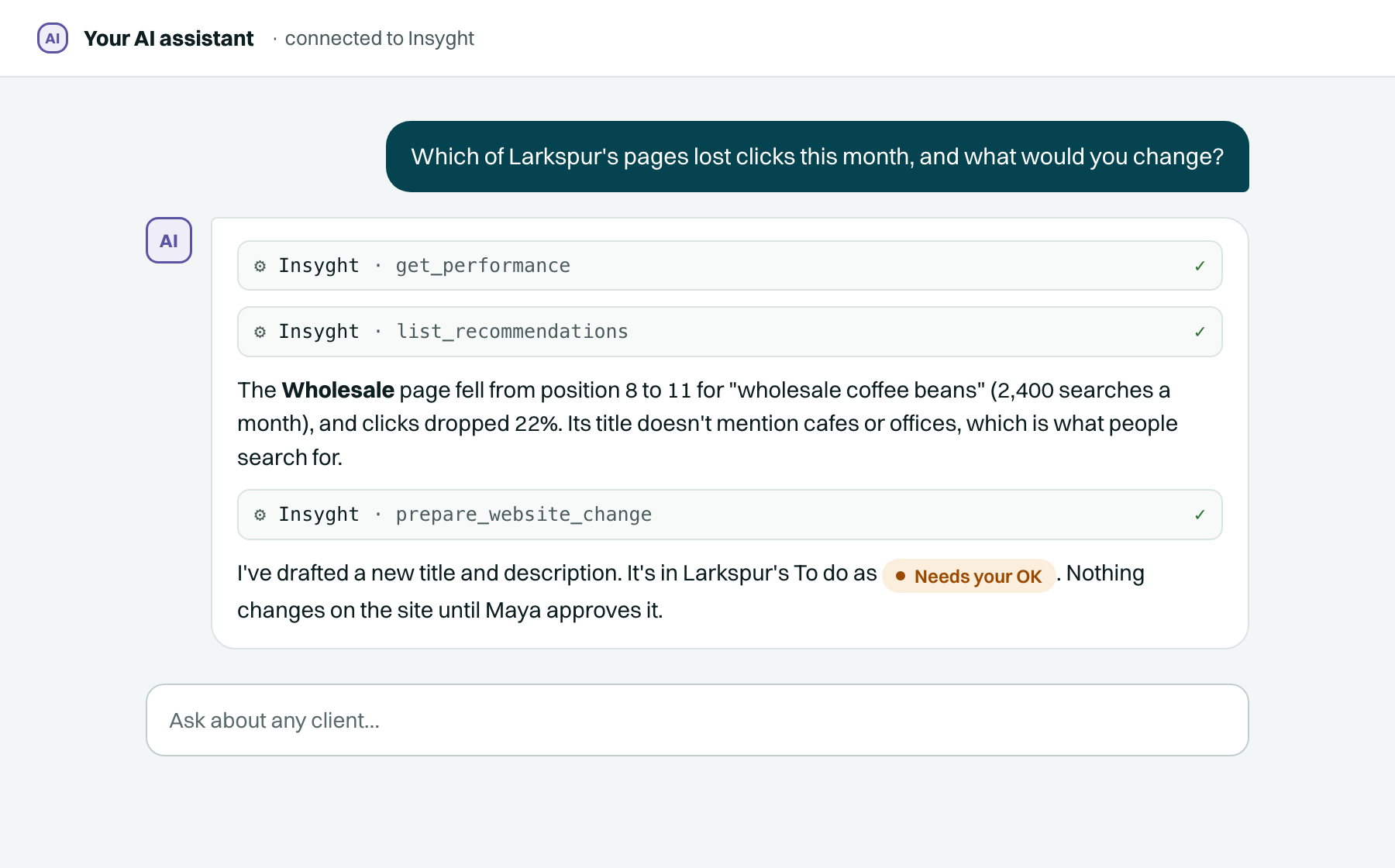
Insyght is an SEO MCP server for agencies that do search and local work for small businesses. Connect Claude, ChatGPT or any MCP client, and your agent can read a client's rankings, plan the work and draft changes. It can't publish them. A person approves every website change, and Insyght publishes it in the client's quiet hours.
What an SEO MCP server does in Insyght
MCP (Model Context Protocol) is the open standard AI assistants use to call outside tools. An SEO MCP server gives an assistant tools for search work. In Insyght, those tools work on the same client record your team uses in the dashboard.
Insyght has 120+ tools. They cover setup, research, planning, drafting and reports. They stop where a person's decision starts.
What an agent can reach
- Orientation: Who you are, which organisations and sites you can see.
- Site setup: Add a site, its business details, competitors and objectives.
- Connections: Link Search Console and Analytics, add SEMrush or DataForSEO keys.
- Strategy record: A versioned plan with diffs and a note on every change.
- Notes: Questions, objections and handoffs between agents and people.
- Recommendations: Ranked opportunities with their evidence, to review or reject.
- Website changes: Prepare a title, description or text change, with a reason.
- Findings and pages: Site audit issues, page data and the internal link graph.
- Keywords: Tracked keywords, clusters and which page owns each one.
- Performance: Search and Analytics numbers, events and measured experiments.
- Reports: Monthly reports, plus share links you can turn off.
- Business Profile: Reviews, draft replies, proposed listing edits and insights.
- Market data: DataForSEO keyword, SERP and competitor data, metered and logged.
Works with Claude, ChatGPT and any MCP client
Use it from claude.ai, Cowork, ChatGPT, Claude Code, or any client that speaks MCP. Every client works under the same limits.
Connect Claude or ChatGPT in a minute
Both ways end with a named agent on your account that you can disconnect at any time.
Remote connector (claude.ai, Cowork, ChatGPT)
- Add a custom connector with this URL:
https://seoagent.insyght.studio/api/mcpthe connector URL - Sign in to Insyght with your password or Google.
- Check which client is asking, then click Allow.
There's no token to copy. It uses the MCP authorization spec: OAuth with PKCE and dynamic client registration.
If your client doesn't support OAuth, make a connector URL instead in Site settings → Agents → New connector. Insyght shows it once.
Claude Code
- Add the Insyght MCP server to Claude Code.
- Ask Claude anything about a client site. It calls the
logintool, which opens your browser. - Sign in and approve. You're done.
The credential stays on your machine, readable only by you.
Agents draft. A person approves.
The risky step in agent SEO work is the moment something changes on a client's live site. Insyght lets agents do the work up to that point and keeps that step for people.
What agents can do
- Read rankings, Search Console, Analytics and audit findings
- Write and update the site's strategy, with a note saying why
- Review recommendations, or reject them with the conditions for raising them again
- Prepare a website change, with a rationale the business owner will read
- Draft and redraft Google Business Profile review replies
- Propose Business Profile listing edits
- Pull reports and share them with a link you can turn off
What no agent can do
- Approve, publish, schedule or undo a website change
- Approve a review reply or a listing edit
- Store WordPress or Webflow publishing credentials
- See your Google refresh token
- Post a "decision" in the notes
- Archive a site or disconnect a connection
- Create or revoke agent access, or invite people to your organisation
Where the approval happens
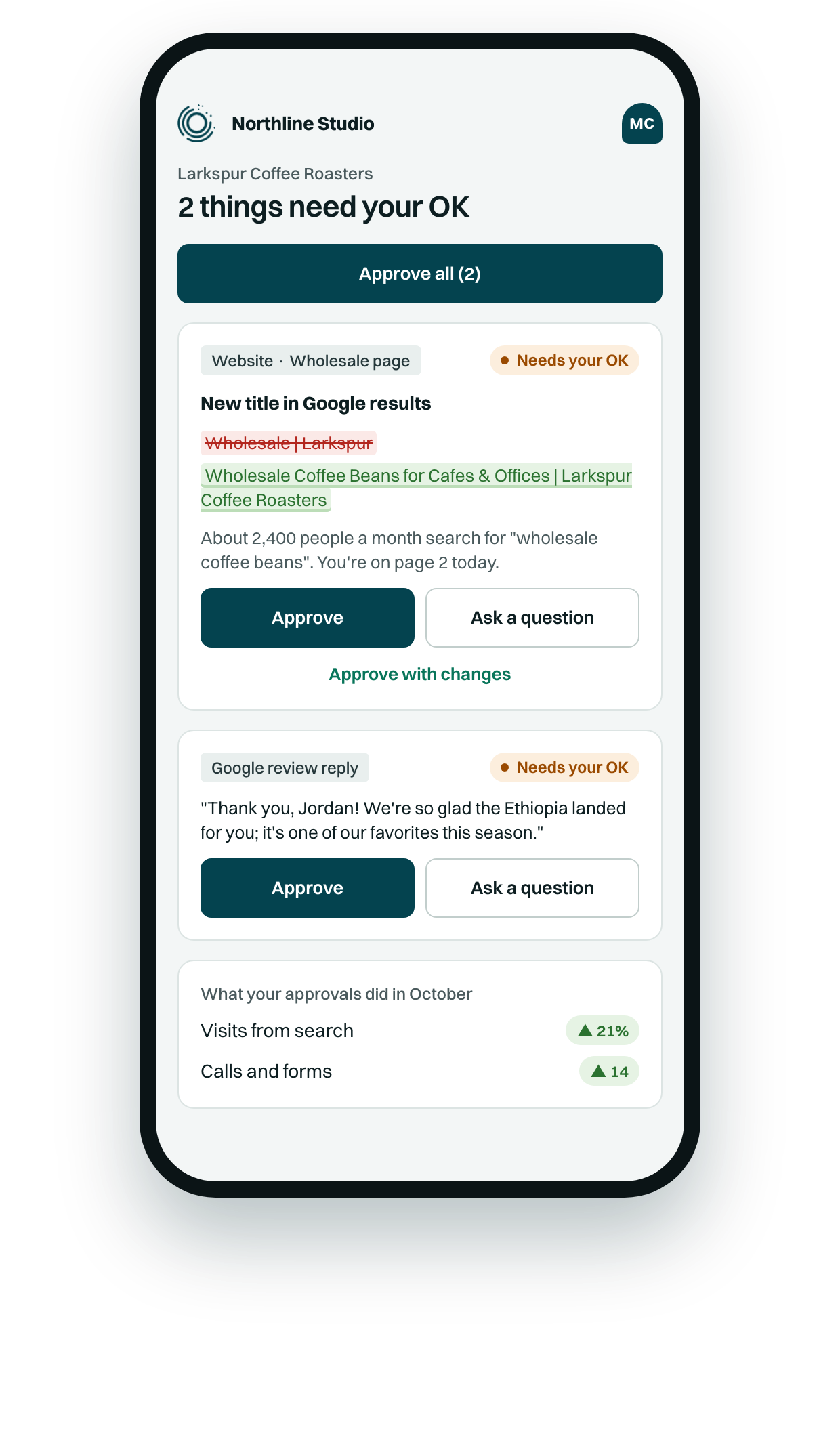
A prepared change waits for the business owner or your agency, depending on the client's approval settings. The owner sees it on their phone, with the agent's reason in plain words.
Once it's approved, Insyght publishes it in the client's quiet window, checks the live page, and keeps a way back for 30 days. See client approvals and publishing and undo.
Your agent can analyse and draft as much as you like. The client's site only changes after someone says yes.
Built so agent access is safe to grant
- The agent uses the API like a person does. The MCP server calls Insyght's API and never touches the database, so the same account boundary, change rules and audit log apply.
- Publishing credentials stay out of reach. WordPress and Webflow connect only in the dashboard. If an agent tries to save them, it gets refused (403).
- Google secrets skip the agent. When an agent connects Search Console or Analytics, the account owner clicks Allow on Google. The refresh token goes straight into encrypted storage. The agent never sees it.
- Every agent has a name. Each connection is a named agent, like "Claude" or "SEO Strategy Agent", and that name labels everything it writes. Revoke one in Site settings → Agents and it's cut off straight away.
- Notes are information, not orders. Insyght tells every connected agent that other agents' notes are something to weigh, never instructions to follow. That limits prompt injection between agents, and no note can authorise a change.
Several agents, one strategy record
You might have an agent in Claude, another in ChatGPT and a person on your team all working one client. They share one record.
The strategy is versioned. Each update writes a new version with a diff and a change note, labelled with the agent or person who wrote it. Dropping a planned initiative or a guardrail has to be confirmed.
Agents talk through notes attached to the thing they concern: questions, objections, proposals and handoffs. Each agent has an inbox.
Every session starts the same way: whoami, then get_strategy, then the notes inbox. Agents answer what's waiting before proposing new work.
Search Console, Analytics and Business Profile data in one place
Google Search Console and Analytics 4
One Google sign-in by the account owner connects both. Insyght picks the matching properties when it can. It works as a Google Search Console MCP for each client site, inside the client's record.
Google Business Profile
Reviews, replies, listing details, insights and competitors for each location. Agents draft replies and propose edits. A person approves them. More about Business Profile.
SEMrush and DataForSEO
Use your own keys or the platform's. DataForSEO calls run on the server, so the agent never holds the credentials, and each call is metered and logged.
Insyght vs. a plain SEO data MCP
Many SEO MCP servers are data feeds: keyword, backlink or crawl data for an assistant to read. That's fine for research. Client sites need a review step before anything changes.
| A data-only SEO MCP server | Insyght |
|---|---|
| Returns keyword, ranking or backlink data | Returns your client's own data, plus findings and ranked recommendations |
| Often read-only, or writes without a review step | Agents prepare changes; the owner or agency approves each one |
| Publishing, if any, is up to you | Publishes in quiet hours, checks the live page, 30-day undo |
| Stops at the data | Measures each change and drafts the monthly report |
FAQ
Something else? Ask us
What is an SEO MCP server?
An SEO MCP server connects an AI assistant such as Claude or ChatGPT to SEO tools through the Model Context Protocol. The assistant can then read data and take actions by calling those tools. Insyght is an SEO MCP server for agencies with 120+ tools: it reads each client's search data, plans and drafts the work, and leaves approval and publishing to a person.
How do I use MCP for SEO with Claude or ChatGPT?
In claude.ai, Cowork or ChatGPT, add a custom connector with the URL https://seoagent.insyght.studio/api/mcp. Sign in to Insyght with your password or Google, check which client is asking, and click Allow. In Claude Code, the login tool opens your browser so you can sign in. Then ask your agent about a client site.
Which SEO MCP server is best for agencies?
For agency work, look for one that keeps client approval and publishing under your control, not only one with the most data. Insyght is built for agencies serving small businesses. Agents analyse and prepare changes, the business owner or agency approves each one, and Insyght publishes in quiet hours with 30 days to undo it.
Can an AI agent publish changes to my client's website?
No. In Insyght an agent can prepare a website change and must give a reason the business owner will read. No tool approves, publishes, schedules or undoes a website change. The owner or your agency approves it, and Insyght publishes it in the client's quiet window, checks the live page, and keeps it undoable for 30 days.
Is it safe to give an AI agent access to Search Console?
In Insyght, the agent starts the connection, but the Google account owner clicks Allow on Google's own page. The refresh token goes straight into encrypted storage, so the agent never sees it. The agent reads Search Console and Analytics data through Insyght's API, and you can revoke its access at any time in Site settings → Agents.
Does the agent see my WordPress or Webflow password?
No. WordPress and Webflow publishing connections are set up only by a person in the Insyght dashboard. If an agent tries to save publishing credentials, Insyght refuses the request. Agents can check whether a connection is working, but they never hold the credentials, and every published change still needs a person's approval first.
How do I remove an agent's access?
Go to Site settings → Agents in the Insyght dashboard. Every connected agent is listed by name, such as "Claude" or "ChatGPT". Revoke the one you want, and it is disconnected straight away. Creating and revoking agent access can only be done in the dashboard, so an agent can't grant access to itself or to another agent.
Can the agent email my clients?
No. Agents in Insyght never send email to your clients. When a change needs the owner's approval, Insyght sends the approval email itself, under your agency's name, logo and reply-to. The owner approves from the link in that email. Agents can draft the change and the reason the owner reads, but a person decides what goes out.
Get early access
We're bringing on a small number of agencies at a time. Tell us about yours, and we'll set up your workspace with you, starting with one of your own clients.
Pricing is agreed when we set you up. How pricing works
